JUnit Platform Suite Engine
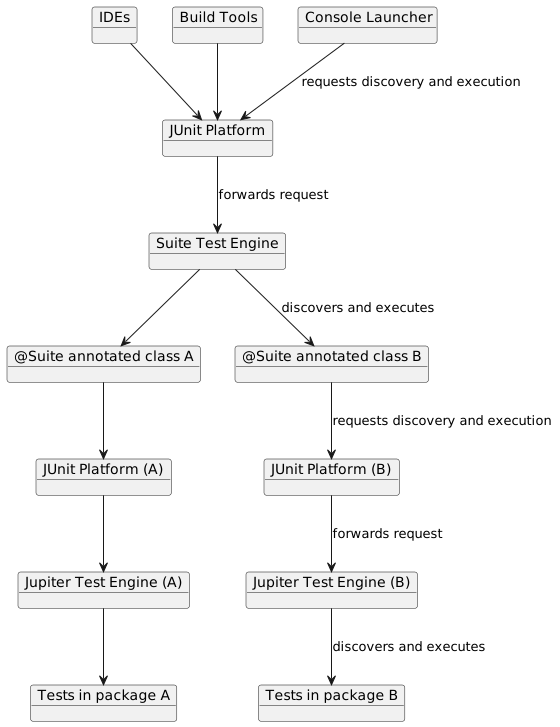
The Suite Engine supports the declarative selection and execution of tests from any test engine on the JUnit Platform using the JUnit Platform Launcher API.
Setup
In addition to the junit-platform-suite-api and junit-platform-suite-engine artifacts,
you need at least one other test engine and its dependencies on the classpath. See
Dependency Metadata for details regarding group IDs, artifact IDs, and versions.
Required Dependencies
-
junit-platform-suite-apiin test scope: artifact containing annotations needed to configure a test suite -
junit-platform-suite-enginein test runtime scope: implementation of theTestEngineAPI for declarative test suites
Both of the required dependencies are aggregated in the junit-platform-suite
artifact which can be declared in test scope instead of declaring explicit dependencies
on junit-platform-suite-api and junit-platform-suite-engine.
|
@Suite Example
Annotate a class with @Suite to have it marked as a test suite on the JUnit Platform. As
seen in the following example, selector and filter annotations can be used to control the
contents of the suite.
import org.junit.platform.suite.api.IncludeClassNamePatterns;
import org.junit.platform.suite.api.SelectPackages;
import org.junit.platform.suite.api.Suite;
import org.junit.platform.suite.api.SuiteDisplayName;

@Suite
@SuiteDisplayName("JUnit Platform Suite Demo")
@SelectPackages("example")
@IncludeClassNamePatterns(".*Tests")
class SuiteDemo {
}|
Additional Configuration Options
There are numerous configuration options for discovering and filtering tests in a
test suite. Please consult the Javadoc of the org.junit.platform.suite.api package for a full
list of supported annotations and further details.
|
@BeforeSuite and @AfterSuite
@BeforeSuite and @AfterSuite annotations can be used on methods inside a
@Suite-annotated class. They will be executed before and after all tests of the test
suite, respectively.
@Suite
@SelectPackages("example")
class BeforeAndAfterSuiteDemo {

	@BeforeSuite
	static void beforeSuite() {
		// executes before the test suite
	}

	@AfterSuite
	static void afterSuite() {
		// executes after the test suite
	}

}
Duplicate Test Execution
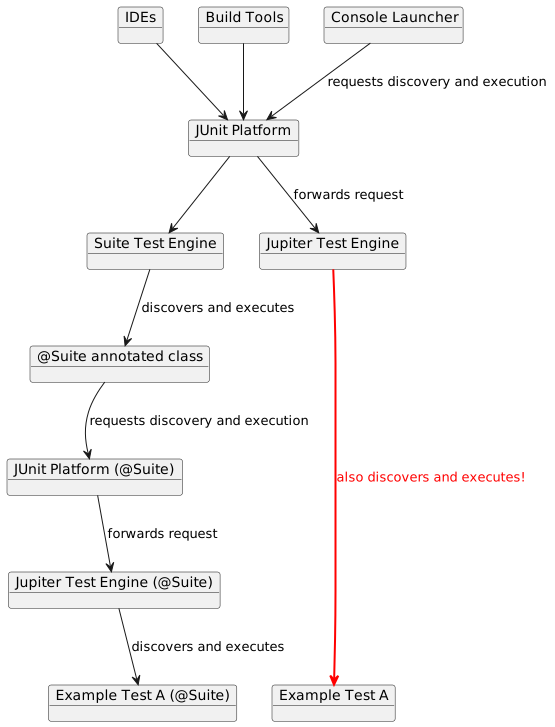
Depending on the declared selectors, different suites may contain the same tests, potentially with different configurations. Moreover, tests in a suite are executed in addition to the tests executed by every other test engine, which can result in the same tests being executed twice.
To prevent duplicate execution of tests within a suite, configure your build tool to
include only the junit-platform-suite engine, or use a custom naming pattern. For
example, name all suites *Suite and all tests *Test, and configure your build tool to
include only the former.
Alternatively, consider using tags to select specific groups of tests.